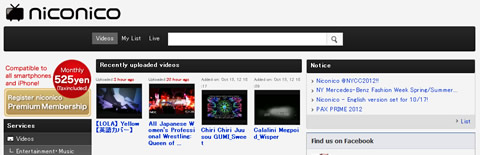
Vocaloid Fans Rejoice! Nicovideo Now Available in English
Back on October 1st, Nicovideo announced that they would be updating the site to support English visitors. This change comes at the same time as Nicovideo’s full transition to their new “Niconico Zero” interface.
Go ahead and check it out for yourself. This will certainly make site usage and navigation much easier for Vocaloid fans.
EDIT: Please make sure that you are registered on either niconico.com or nicovideo.jp. Then change the language setting at the bottom of the page.


Finally. Can’t wait to scour that site for every video for days on end.
This is great news!
We could not find Japanese videos in niconico.com until now.
But, it is now displayed properly now in niconico.com.
I’m sorry in poor English.
Sorry.
Correction:
Mistake:
But, it is now displayed properly now in niconico.com.
Correct:
But, it is now displayed properly now in .nicovideo.jp.
[...] Quelle: MikuFan.com [...]
Great News!!! But…
How to turn on the English version!?
Why is my nicovideo.jp still in Japanese???
Please help me. T_T
Hmm, how to enable it? Mine is still in Japanese.
oh no! now NicoNico goes becoming mainstream!
YESSS!!! WHOOOO!
Please excluding the Japanese from the browser language settings.
Appears in a language other than Japanese if it does so.
@Y.Tsujii: That’s odd though… I have Firefox configured to allow Japanese text when available, and my browser still shows Nicovideo in English.
@jrharbort:
Because, it is located under in your browser language settings-list may be.
I’m sorry in poor English.
@Y.Tsujii: Browser language priority:
#1: English
#2: Japanese
@jrharbort:
That is it!
News!
Fan-made live in Vietnam.
http://www.youtube.com/watch?v=QQ0KO_VtrQI
I’ve already scroll down to the bottom of the page, but I still cannot find any language settings on the web:
http://postimage.org/image/6h8hakpbh/
@airgeneralpong:
Do you use Internet Explorer ?
If you are using Internet Explorer then,
Please change your Internet Explorer language settings.
http://ie-support.blogspot.jp/2011/02/how-to-change-language-settings-in.html
language priority:
1st. English
2nd. Japanese
@Y.Tsujii:
It’s now working! Thank you very much. \(^0^)/
My browser was fixed to only my language, so it’s never show that language option in nicovideo.jp until I add English in my browser.
I actually use Google Chrome, but my Chrome browser is in my language’s version, so it’s very difficult to find the browser’s “language setting” in my own language (they translate the browser very badly).
Anyways, thank you again. ^^
So… How do I change it back to Japanese?
Well, it is much easier now, but when I open “VOCALOID” section, many of them still in Japanese, especially the title of the video. We can do nothing except the owner of the video change the title to alphabet or romanji.
By the way, how to change the video resolution?
@airgeneralpong:
If Google Chrome.
1.Please click the “Customize and control Google Chrome” button at the top right of the browser.
2.Please click “Settings” from the drop-down list.
3.Please click the “Show advanced settings …” at the bottom of the window.
4.Scroll down the screen.
Please click the “Language and spell checker-settings…” button.
5.Please click the “English(United States) “.
6.Please click the “Display Google Chrome in this language” button.
7.Please click “OK” button.
Please restart Google Chrome.
*.Please add by clicking on the “ADD” button if there is no English in the list of languages.
@DrCruse:
If you are using Internet Explorer then,
Please change your Internet Explorer language settings.
language priority:
1st. Japanese
2nd. English
@:Heru Tri K
Nico Nico Douga is always crowded.
Free members, low quality view on crowded time zone.
In order to view high quality must be registered with the premium membership.
I’m sorry in poor English.
Google Translate I’ve used always, use it too, my young padavan.
If you change the browser language and the language doesn’t change, you may need to clear your cache.
The Q version of Zero is really nice, it fixes a lot of the issues that X had. Also noticed that they have comment language flag at the bottom. Used to be only Japanese and Chinese but now has English. They probably separate the comments that flow across the screen that way.
This is a pretty terrible update, thanks to this I cant comment in japanese anymore. I switched my typing to 日本語 but even still it says “that language isn’t supported” bullshit. This seems like a stupid ploy to prevent foreigners from commenting on videos. What, does nicovideo develop VNs too?
@anon: Scroll to the bottom of the page and simply switch the site language back to Japanese.
Related Posts